MuseDAM supports instant online preview for 90+ file formats — including images, videos, design source files, documents, 3D models, audio, and more. No downloads or additional software required. Your team can review assets directly in the browser, making it faster and easier to browse, evaluate, and approve content at scale.
Common use cases
Preview PSD and AI design files online so creative teams can review materials without needing design software installed locally
Stream high-definition video assets directly in the browser, making it easy for distributed teams to review ads and brand films in real time
View FBX, GLB, and other 3D model files instantly to speed up cross-team review and sign-off on product assets
Browse PDFs, PowerPoints, product briefs, and proposals without switching between tools
Before you begin
Availability: All MuseDAM plans
Permissions required: Asset view permission
Recommended browsers: Latest version of Chrome, Firefox, Safari, or Edge
🚀 Quick Start
Go to any asset library or folder and find the file you want to view
Click a file thumbnail to open the preview panel on the right — or double-click to enter full-screen preview mode
MuseDAM automatically detects the file format and loads the appropriate preview
Once loaded, you can view the full content — play videos directly, or rotate and zoom 3D models interactively
✨ Expected result: File content renders completely in your browser — no downloading or switching to an external app needed.
📋 Step-by-Step Guide
1)Filtering Assets by Format
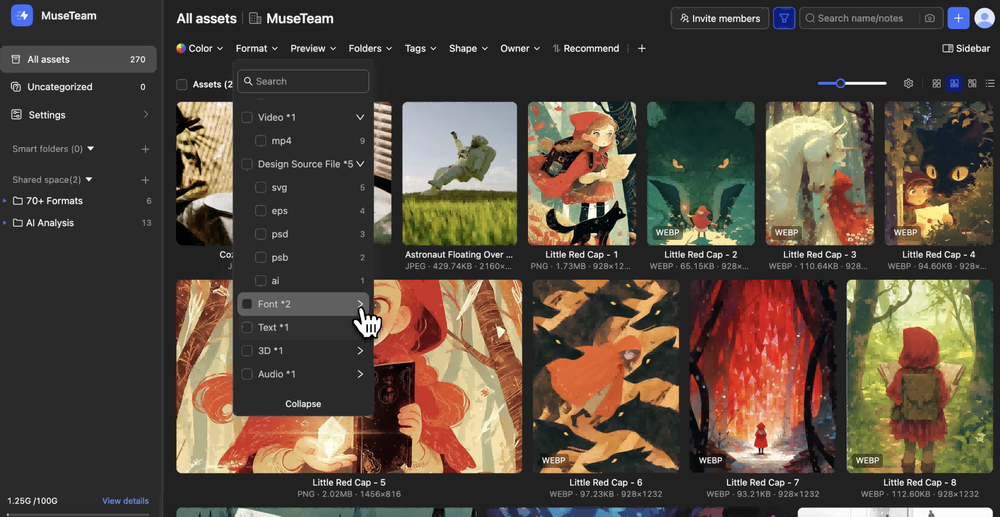
Click the Format dropdown in the filter bar at the top of the asset library
Formats are grouped by category and display asset counts — for example, Images ×9 or Design Source Files ×6. Click a category to expand it and see specific formats (e.g. psd, ai, eps, sketch)
Select a format to automatically filter the library and show only matching assets
🎮 3D Model: obj、ply、3ds、gltf、glb、fbx、stl、c4d、stp、iges、3dm、stp、rhino、iges、blend
📊 Spreadsheet: et、xls、xlt、xlsx、xlsm、xltx、xltm、csv
🔤 Font: ttf、otf、ttc
🎵 Audio: mp3、m4a、wav、flac
📖 E-book: epub
🌐 Web: url
❓ Frequently Asked Questions
Q: The file shows "Preview unavailable" or fails to load — what should I do?
For large files such as high-definition videos, the first load may require transcoding. Give it a moment and try again
Refresh the page and reopen the preview
Make sure your browser is up to date — we recommend Chrome or Edge for the best experience
Q: My 3D model preview is loading very slowly — is that normal?
Yes, this is expected behavior. Complex 3D models with high polygon counts or large textures naturally take longer to load. For the smoothest experience, use a device with solid performance and a reliable internet connection when working with 3D assets.
Q: I can't find a specific format in the format filter — what should I check?
Click the Expand All button at the bottom of the format dropdown to reveal all sub-format categories
Check whether the format is on the supported list above. Formats not on the list are not currently supported for online preview